PowerPC Machine Code generator Experiment.
I have been looking at ways to convert float to int fast, lately.
I have been thinking about this video.
https://www.youtube.com/watch?v=So-m4NUzKLw
C64 Demo coders trying to make C64 do more than they should able to do.
So there has been lots of talk about JIT compiler in Amiga community, EUAE jit compiler by Álmos Rajnai.
JIT
compilers made a big difference in speed.
What
I wont to find out.
1)
If the loops that GCC can't unroll, is unrolled by the machine code generator what difference does it make, to unroll the loops completely.
2)
So what I was wondering about is, if it was possible to generate code scaled to Instruction cache, to eliminate unnecessary machine code, and eliminate cache misses.
3)
Does it make difference to try unroll loops or not, in C code.
Disclaimer:
I'm no expert in PowerPC assembler, but I have some experience with assembler trying to code for MC68000 using inline assembler on Amiga500/BlitzBasic2, and from my school years at "VK2" Data Technical, and for 2 years at Technician school at Kongsberg, coding the Z80, 6802/6804 chips, as educational tool. I have some experience with PowerPC, trying to optimize things in Basilisk II, So I'm not hard core Machine code head.
If you ask
me about name of some opcode, I will not know too many years ago, but
fundamentals is the same, interrupts, machine code, thing stored, thing gets
loaded, added, registers, flags.
The rules
of the game.
So normally your write inline assembler, we let the compiler pick the registers, and handle saving and restoring registers, but we are not going to do this.
This how GCC normally generate code.
R0 is used for temporary storage.
R1 is revered for stack.
R2 is reserved, your not allowed to use this one.
R3 to R10 can be used for arguments.
R3 is also used as return value.
Using the optimization 3 in GCC or O3 flag, GCC expects R4 to R10 to be unchanged.
So this is the basic game rules we need to keep in mind.
Other things we need to think about is that memory going to execute need to be flagged for it to be executable, unlike on 680x0.
Before the memory is executed, we need to flush instruction cache. If we don't do that, we can't be sure the machine code in cache is correct. Unless we
flush it.
So next, I'm going to explain the procedure, of finding the machine code, and understanding whats going on, the tools.
Well there is "GCC", write some C code, compile it, and then disassemble it, look at the result.
to disassemble, I use objdump.
objdump -d a.out
or
objdump -d -S a.out
So what you see.
The relative address, then the machine code, and then assembler name, command.
So to generate machine code, I need the machine code, the assembler name, is only useful to understand what machine code does, who remembers hex numbers?
Well you
can look up IBM documentation, but they are not good, if you want to write
code, they explain what assembler does, but not what assembler opcodes that
goes with that, (there is no see also reference.)
So as noob you get stuck quickly, if you only try to read there documents.
Time
for the code
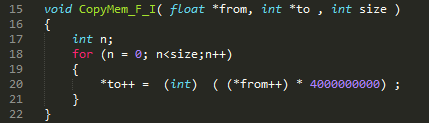
So here is we have a typical function, so to convert x number of floats to int's.
This the same function, we have unrolled it, so that it takes fewer loops to execute, some people says this does not make any difference, that C compiler do that anyway, well we see :-)
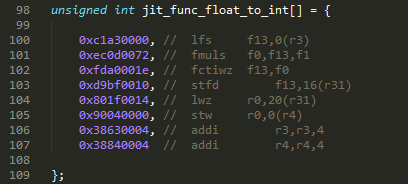
This the typical machine code, you get when decompile a C program compiled with no optimization, I have added two machines codes extra to load R3 and R4, this because of GCC O3 flag.
When compiled with O3 flag, the stw, r3 and r4 is stripped away by the compiler, what stw does, is store the r3 and r4 registers on stack.
This is the actual code, we need to run many times, again there are two extra machine codes I have added, to move to next source and destination address, the addi r3,r3,4 and addi r4,r4,4.
I was shocked
at amount of instruction needed to do casting between float and int.
converting between int and float should be avoided at all cost on the PowerPC.
This is a for loop that is disassembled. Well I can't copy the code as it is, as the "blt-" opcode offsets, and "b" opcode offsets, need to be calculated.
Set_jit_loop() functions does this, the functions takes number of loops, and the amount of code that goes between the loop, so it can be inserted between the two tables.
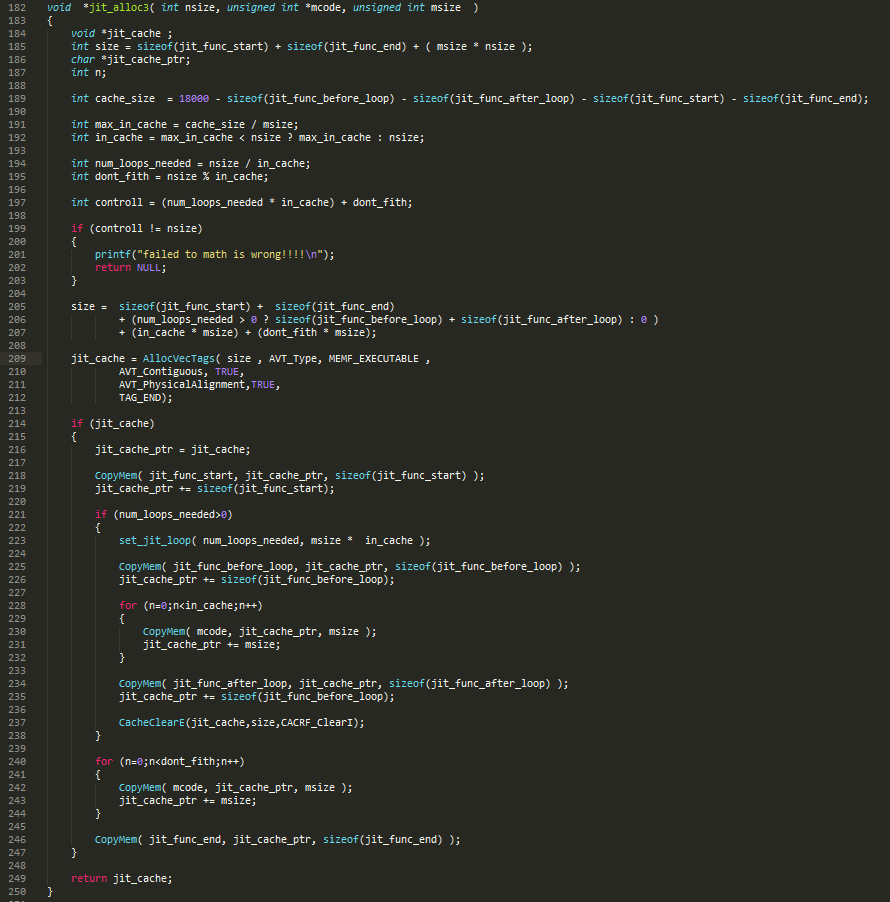
So this function alloc's memory for code,
the result is
"function start"
"float to int" * loops
"function end"
So this function alloc's memory for code,
the result is
"function start"
"for n=1 to num_loops_needed"
"float to int" * in_cache
"next"
"float to int" * don’t_fith
"function end"
So this is bit smarts, we try find out what max number of float_to_int we can fit into instruction cache. What I found out is that its not the cache size that is the limiting factor, but max length of indirect jump, that is real limit :-/
Just free the memory after we are done
The main code that runs all the tests
Now for the
results.
Trying
to fit code inside the instruction cache made little difference, it mostly a
waste of time trying to do it.
Assembler optimized the code, made a big difference compared to C code compiled
without optimization flags.
Compiling standard C code with O3 flag, made big difference, there is almost no
different between assembler optimized code and standard C code.
However, look at unrolled C function, it's was slower without being optimized,
but with O3 is just beats everything.
I guess it is because GCC is able, to take advantage of out of order execution
on PowerPC, GCC cannot unroll the normal C code, because the number of loops is
not static constant, but variable number loops.
So conclusion is, what you write and how you compile the code, make the most
difference, betting the C compiler is hard, even if you are an expert.